SPC Characteristic Datasource


The SPC Characteristic Datasource connects your measurement database to the SPC CAD Panel, powering its feature annotations, embedded trend charts, capability statistics, and forecast visualization — no SQL required.
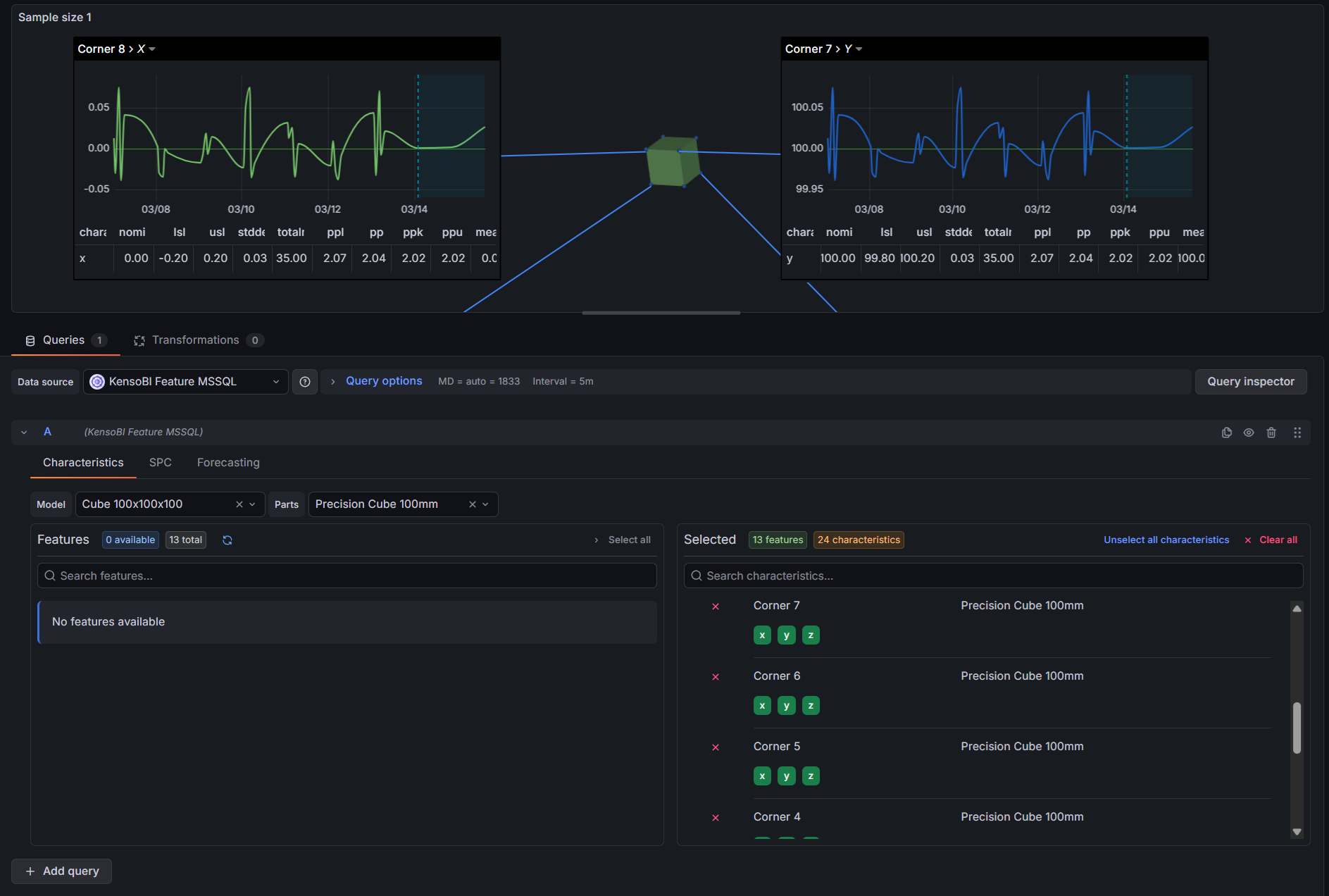
Table of Contents
- Why SPC Characteristic Datasource?
- Features
- Use Cases
- Requirements
- Getting Started
- Configuration
- Query Editor
- SPC Calculations
- Forecasting
- Output Frames
- Part of the KensoBI SPC Suite
- Getting Help
- License
Why SPC Characteristic Datasource?
The SPC CAD Panel displays CAD models in 3D with clickable feature annotations. Each annotation can show measurement tables, embedded trend charts, and forecast lines — but it needs a datasource that understands the structure of a measurement database and returns data in the right shape.
That is what this datasource does. It connects to your PostgreSQL or MSSQL measurement database, gives you a point-and-click interface to select which features and characteristics to include, and returns everything the CAD panel needs in a single query:
featuresframe — one row per characteristic with SPC statistics (mean, UCL/LCL, Cp/Cpk, etc.) and metadata (nominal, LSL, USL). This is what populates the annotation tables and drives the color-coding rules in the CAD panel.timeseriesframe — individual measurements over time for each characteristic. This is what the CAD panel's embedded trend charts and SPC chart components display.forecast-upper-bound/forecast-lower-boundframes — predicted future values with confidence intervals. The CAD panel renders these as a forecast line with a shaded confidence band extending beyond the last measurement.
Writing this SQL by hand for every characteristic on every dashboard would be impractical. The SPC Characteristic Datasource builds and executes the correct nested subgroup aggregation queries automatically, applying the right Shewhart constants for your sample size and chart type.
Features
| Feature | Description |
|---|---|
| Visual feature selector | Transfer-list UI to browse and select features and characteristics by model and part |
| Cascading filters | Selecting a model narrows the parts list; selecting a part narrows the features list |
| SPC statistics | Mean, UCL/LCL, Cp, Cpk, CPL, CPU, Cpm, Pp, Ppk, std dev, min, max, total in tolerance, and more |
| Subgroup aggregation | Configurable sample size (1–10) with mean, range, or standard deviation aggregation type |
| Time series output | Individual measurements over time, one column per characteristic |
| Built-in forecasting | Moving Average, Linear Regression, Holt, and Holt-Winters — runs in the browser, no external service |
| Forecast confidence bands | Upper and lower prediction intervals at 80%, 90%, 95%, or 99% confidence |
| Schema presets | One-click setup for KensoBI and Q-DAS database schemas |
| Custom schema mapping | Map any database structure with table and column pickers |
| Custom columns | Add extra columns from any mapped table to the output frames |
| PostgreSQL and MSSQL | Delegates query execution to any existing Grafana SQL datasource |
Use Cases
- Interactive CAD inspection reports — bind measurements to 3D part geometry in the SPC CAD Panel; click any feature to see its statistics, trend chart, and forecast
- Process capability monitoring — track Cp, Cpk, Pp, and Ppk per characteristic directly in annotation tables
- Early warning forecasting — detect when a characteristic is trending toward a specification limit before it gets there
- Q-DAS database integration — connect directly to existing QDAS measurement databases without modifying the schema
- Custom metrology databases — map any database that follows the feature → characteristic → measurement pattern
Requirements
- Grafana 11.6.10 or later
- A configured Grafana PostgreSQL or MSSQL datasource pointing to your measurement database
Getting Started
- Install the SPC Characteristic Datasource from the Grafana Plugin Catalog.
- In Grafana, go to Administration → Data sources → Add new data source and search for SPC Characteristic.
- Under Database Connection, select the existing PostgreSQL or MSSQL datasource that connects to your measurement database.
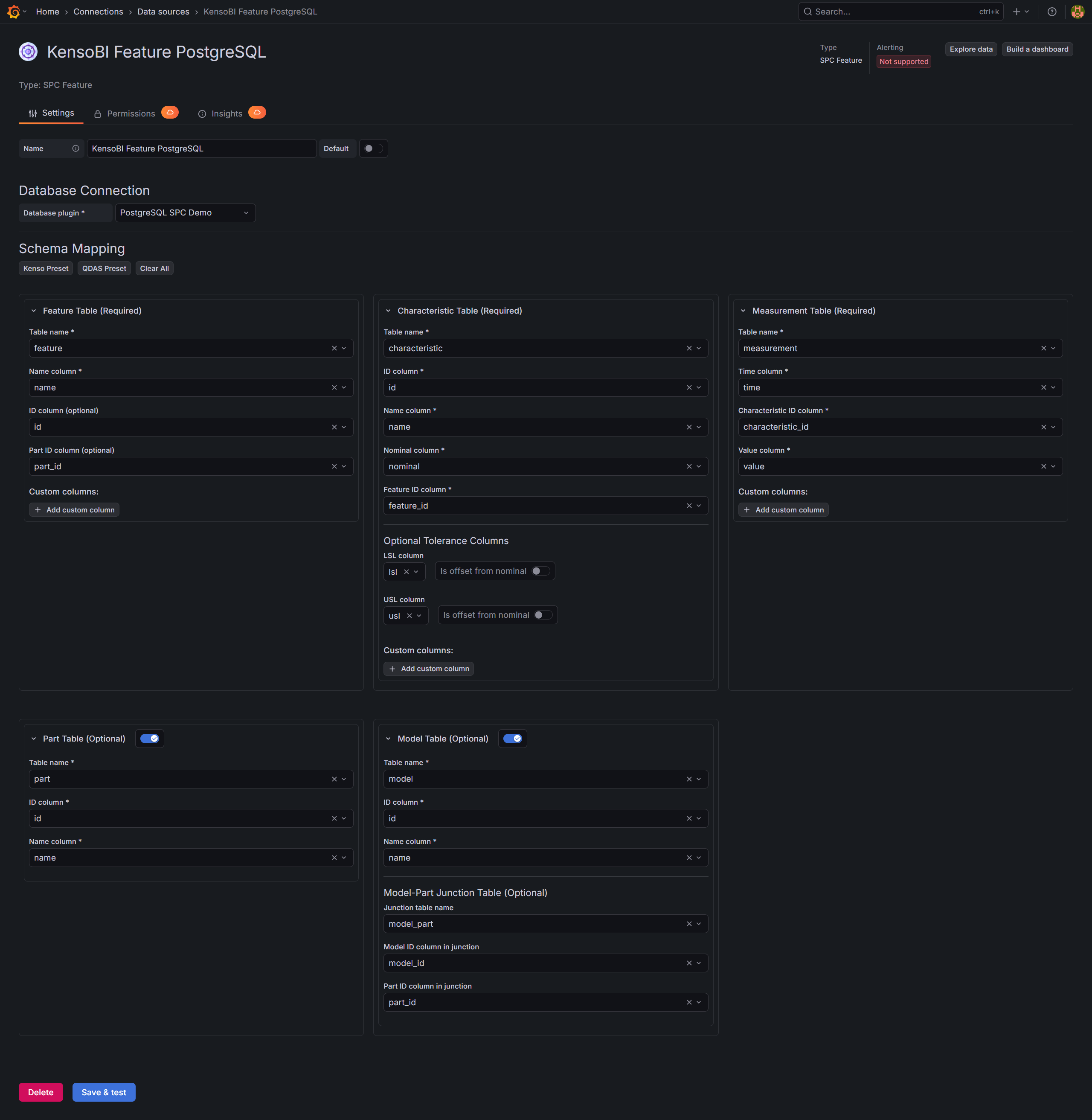
- Under Schema Mapping, click Kenso Preset or QDAS Preset if your database uses one of those schemas, or configure the table and column mappings manually.
- Click Save & test to verify the connection.
- Open an SPC CAD panel, set the data source to SPC Characteristic, and open the query editor.
- In the Characteristics tab, filter by model or part, then move features to the right-hand list.
- Open the SPC tab to enable the statistics you want in annotation tables (mean, UCL/LCL, Cp/Cpk, etc.).
- Optionally open the Forecasting tab to enable forecast lines in annotation trend charts.
Configuration
Database Connection
The SPC Characteristic Datasource does not connect directly to your database. Instead, it delegates query execution to an existing Grafana SQL datasource. Connection credentials, SSL settings, and authentication are all managed by the underlying SQL datasource — the SPC Characteristic Datasource only adds the query-building and SPC calculation layer on top.
Supported underlying datasource types:
| Plugin | Type identifier |
|---|---|
| Grafana PostgreSQL | grafana-postgresql-datasource |
| Grafana MSSQL | grafana-mssql-datasource |
| MSSQL (legacy) | mssql |
Select the database plugin from the Database plugin dropdown. Only datasources of the supported types will appear.

Schema Mapping
After selecting a database plugin, configure the Schema Mapping section. This tells the datasource which tables and columns hold your feature, characteristic, and measurement data.
The schema is split into three required sections and two optional sections:
| Section | Required | Description |
|---|---|---|
| Feature Table | Yes | The table listing geometric features (holes, surfaces, edges, etc.) |
| Characteristic Table | Yes | The table listing measurable characteristics with nominal values and tolerances |
| Measurement Table | Yes | The table containing individual measurement records with timestamps |
| Part Table | No | Enables filtering features by part name in the query editor |
| Model Table | No | Enables filtering parts by model and enables the Model dropdown in the query editor |
Each section uses dropdown pickers populated by automatic schema discovery from your database connection, so you can point and click rather than type names.
Preset Schemas
Click one of the preset buttons to populate all required fields automatically:
Kenso Preset — matches the KensoBI measurement database schema:
| Table | Columns | Purpose |
|---|---|---|
feature | id, name, part_id | Feature identifier and name |
characteristic | id, name, nominal, feature_id, lsl, usl | Characteristic with tolerance offsets from nominal |
measurement | time, characteristic_id, value | Individual measurements |
part | id, name | Parts |
model | id, name via model_part junction | Models |
Note: In the Kenso schema, lsl and usl are stored as offsets from nominal (LSL = nominal + lsl, USL = nominal + usl).
QDAS Preset — maps to the Q-DAS merkmal/wertevar schema commonly used by CMM software:
| Table | Columns | Purpose |
|---|---|---|
merkmal | memerkmal, memerknr, menennmas, meugw, meogw | Characteristics (features extracted from memerknr pattern) |
wertevar | wvdatzeit, wvmerkmal, wvwert | Individual measurements |
teil | teteil, tebezeich | Parts |
Note: QDAS does not support a model table. Tolerances are also stored as offsets from nominal.
Custom Schema Mapping
If your database uses a different structure, configure each section manually:
Feature Table
| Field | Required | Description |
|---|---|---|
| Table name | Yes | Name of the feature table |
| Name column | Yes | Column containing the feature display name |
| ID column | No | Primary key column. If omitted, the name column is used as the ID |
| Part ID column | No | Foreign key to the part table — required for part-based filtering |
| Custom columns | No | Additional columns to include in the output features frame |
Characteristic Table
| Field | Required | Description |
|---|---|---|
| Table name | Yes | Name of the characteristic table |
| ID column | Yes | Unique identifier for each characteristic |
| Name column | Yes | Display name shown in the query editor and output |
| Nominal column | Yes | Reference/target value for the characteristic |
| Feature ID column | Yes | Foreign key to the feature table |
| LSL column | No | Lower specification limit column |
| LSL is offset | No | If enabled, actual LSL = nominal + column value |
| USL column | No | Upper specification limit column |
| USL is offset | No | If enabled, actual USL = nominal + column value |
| Custom columns | No | Additional columns to include in the output features frame |
Measurement Table
| Field | Required | Description |
|---|---|---|
| Table name | Yes | Name of the measurement table |
| Time column | Yes | Timestamp column — used for $__timeFilter and time series output |
| Characteristic ID column | Yes | Foreign key to the characteristic table |
| Value column | Yes | Numeric measurement value |
| Custom columns | No | Additional columns to include in the time series output |
Model Table (optional)
When enabled, you can also configure a junction table for the model-to-part relationship if your schema uses a separate join table (e.g., model_part).
Query Editor
The query editor has three tabs: Characteristics, SPC, and Forecasting.
Characteristics Tab
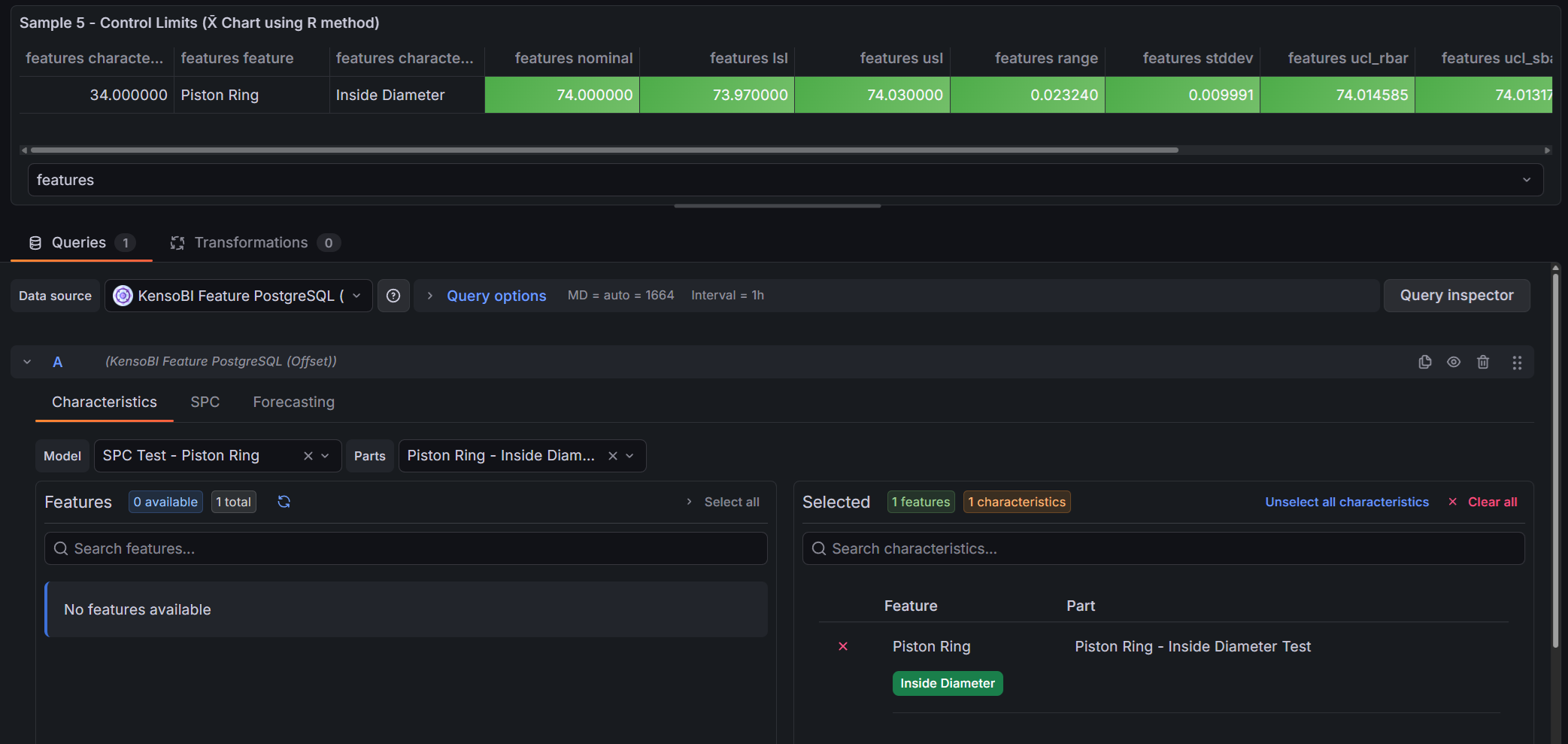
The Characteristics tab is where you choose which data to query.
Filters:
- Model — filters the parts list to only parts belonging to the selected model. Only shown when the Model Table is configured in the datasource settings.
- Parts — filters the features list to only features belonging to the selected part. Selecting a model automatically narrows the available parts.
Transfer list:
The left side shows all available features for the selected model/part combination. Click a feature to move it to the right side (selected). Click it again to deselect it.
When you select a feature, all of its characteristics are added automatically. Below each selected feature on the right side, the individual characteristics are listed as toggle buttons. Characteristics are enabled by default — click one to exclude it from the query. Excluding a characteristic removes it from both the features and timeseries frames, which reduces the amount of data the CAD panel needs to process.
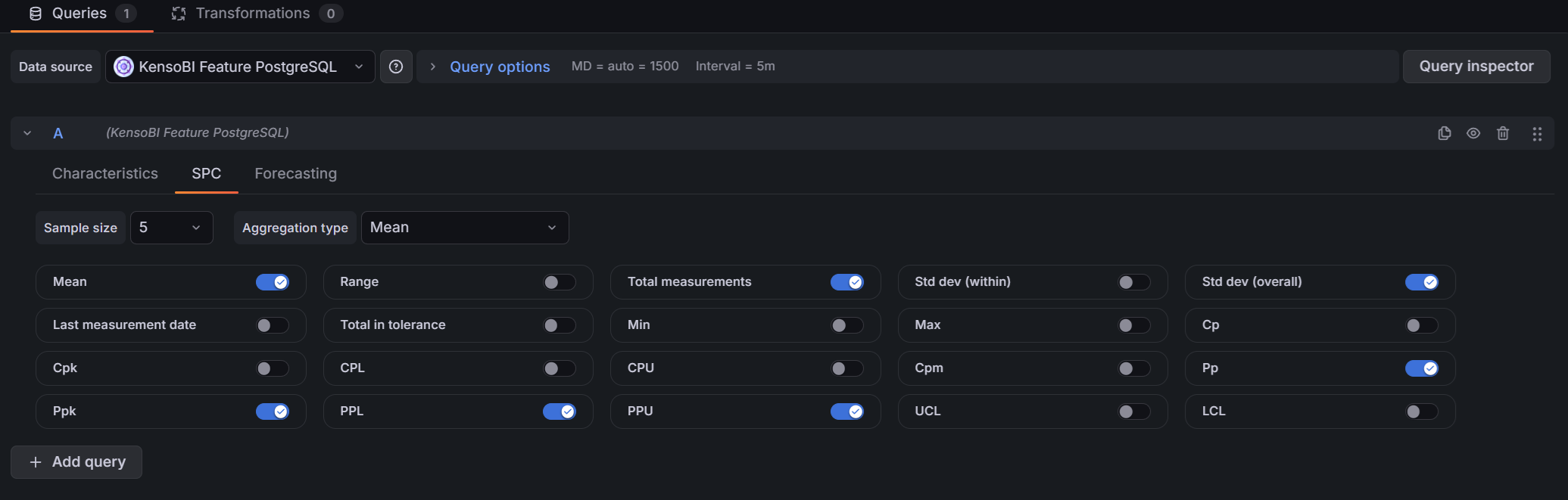
SPC Tab
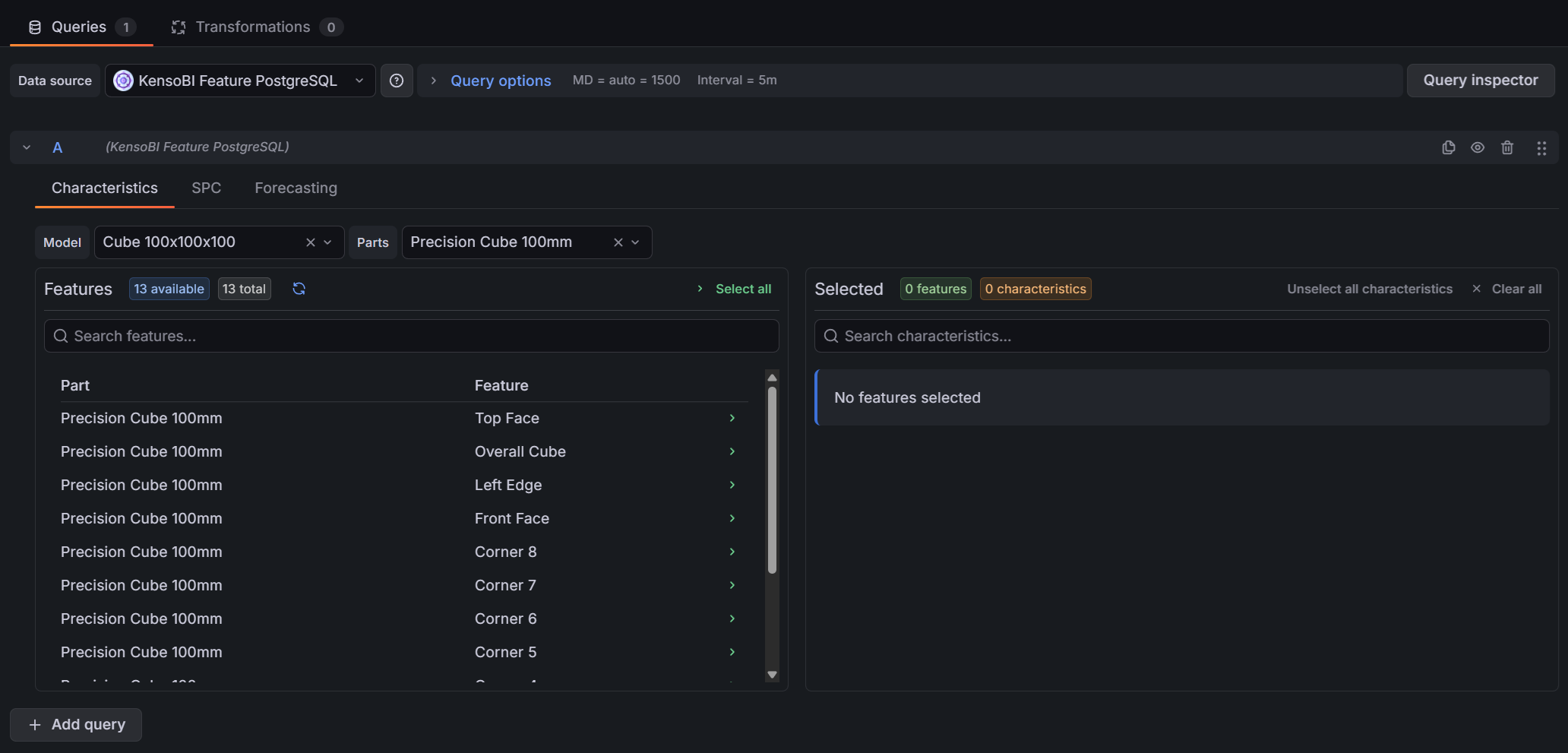
The SPC tab controls which statistics are included in the features frame — the frame that populates annotation tables and drives color-coding rules in the SPC CAD panel.
Top controls:
| Control | Description |
|---|---|
| Sample size | Number of consecutive measurements to group into one subgroup (1–10). Size 1 returns individual measurement statistics with no subgroup aggregation. |
| Aggregation type | How each subgroup is summarized. Only shown when sample size > 1. Options: Mean (X̄-R or X̄-S chart), Range (R-chart), Standard deviation (S-chart). |
Available statistics (toggles):
| Statistic | Description | Availability |
|---|---|---|
| Mean | Grand mean of all measurements (X̄̄) | Always |
| Range | Global range (max − min of all measurements) | Always |
| Total measurements | Count of all measurements in the time range | Always |
| Std dev (within) | Within-subgroup standard deviation estimate (σ̂ = R̄/d₂ or S̄/c₄) | Sample size > 1 only |
| Std dev (overall) | Long-term standard deviation of all individual measurements | Always |
| Last measurement date | Timestamp of the most recent measurement | Always |
| Total in tolerance | Count of measurements within [LSL, USL] | Always |
| Min | Minimum subgroup aggregate (or minimum measurement if n=1) | Always |
| Max | Maximum subgroup aggregate (or maximum measurement if n=1) | Always |
| Cp | Short-term potential capability index | Sample size > 1, Mean aggregation only |
| Cpk | Short-term centered capability index | Sample size > 1, Mean aggregation only |
| CPL | Lower capability index: (mean − LSL) / 3σ̂ | Sample size > 1, Mean aggregation only |
| CPU | Upper capability index: (USL − mean) / 3σ̂ | Sample size > 1, Mean aggregation only |
| Cpm | Taguchi capability index | Sample size > 1, Mean aggregation only |
| Pp | Long-term performance capability index | Mean aggregation only |
| Ppk | Long-term centered performance capability index | Mean aggregation only |
| PPL | Lower performance index: (mean − LSL) / 3σ | Mean aggregation only |
| PPU | Upper performance index: (USL − mean) / 3σ | Mean aggregation only |
| UCL | Upper Control Limit | Sample size > 1 only |
| LCL | Lower Control Limit | Sample size > 1 only |
Forecasting Tab
The Forecasting tab adds a forecast to the query response. When a model is selected, the datasource appends forecast-upper-bound and forecast-lower-bound frames alongside the standard timeseries frame. The SPC CAD Panel uses these frames to draw a forecast line with a shaded confidence band in annotation trend charts, extending beyond the last measured value.
Model selection:
| Model | Best for |
|---|---|
| Disabled | No forecasting (default) |
| Moving Average | Stable data with no trend |
| Linear Regression | Data with a clear linear trend |
| Holt (Trend) | Evolving trends without seasonality |
| Holt-Winters (Seasonal) | Data with repeating seasonal patterns |
Common parameters:
| Parameter | Description | Default |
|---|---|---|
| Forecast Periods | Number of future time steps to project | 10 |
| Confidence Level | Width of the prediction interval: 80%, 90%, 95%, or 99% | 95% |
Moving Average parameters:
| Parameter | Description | Default |
|---|---|---|
| Window Size | Number of recent measurements to average per step | 5 |
Holt parameters:
| Parameter | Description | Default |
|---|---|---|
| Alpha (Level) | Smoothing factor for the level component (0–1) | 0.5 |
| Beta (Trend) | Smoothing factor for the trend component (0–1) | 0.5 |
| Phi (Damping) | Trend damping factor (0–1]. 1.0 = linear extrapolation; 0.9 = trend decays over time | 0.9 |
Holt-Winters parameters:
| Parameter | Description | Default |
|---|---|---|
| Alpha (Level) | Smoothing factor for the level component (0–1) | 0.5 |
| Beta (Trend) | Smoothing factor for the trend component (0–1) | 0.5 |
| Phi (Damping) | Trend damping factor (0–1]. 1.0 = linear extrapolation; 0.9 = trend decays over time | 0.9 |
| Gamma (Seasonal) | Smoothing factor for the seasonal component (0–1) | 0.5 |
| Season Length | Number of periods in one season (e.g., 24 for hourly data with a daily pattern) | 24 |
Holt-Winters requires at least 2 complete seasons of data. For example, with Season Length = 24 you need at least 48 data points. If no forecast appears, reduce the season length or extend the dashboard time range to include more historical data.
Quick Presets:
| Preset | Model | Periods | Notes |
|---|---|---|---|
| +12h Moving Average | Moving Average | 6 | Window size 5 |
| +24h Linear Trend | Linear Regression | 12 | — |
| +2d Holt (Trend) | Holt | 24 | α=0.5, β=0.5, φ=0.9 |
| +1w Holt-Winters (Daily) | Holt-Winters | 168 | Season 24, hourly data |
SPC Calculations
Sample Size and Aggregation Type
The datasource uses a three-level nested SQL query to compute SPC statistics:
- Inner query — selects individual measurement rows within the dashboard time range and assigns each row a sequential
sampleNumberbased on sample size - Middle query — groups by
sampleNumberandcharacteristic_idto compute the subgroup aggregate (sampleAgg): mean, range, or standard deviation per subgroup - Outer query — aggregates across all subgroups to produce the final statistics returned in the
featuresframe
When sample size = 1, the three-level structure simplifies: no subgroup grouping is performed and the statistics describe the population of individual measurements directly.
Available Statistics
| Output column | Formula (mean aggregation) |
|---|---|
mean | avg(sampleAgg) — grand mean of subgroup means |
range | max(value) - min(value) — range of all individual measurements |
totalMeasurements | count(value) |
standardDeviation (within) | avg(sampleRange) / d₂ (R-chart) or avg(sampleStdDev) / c₄ (S-chart) |
stdDevOverall | stddev_pop of all individual measurements, reconstructed from sum/sumSq/count |
lastMeasurementDate | max(time) |
totalInTolerance | Count of measurements where LSL ≤ value ≤ USL |
min | min(sampleAgg) — minimum subgroup mean (or min measurement if n=1) |
max | max(sampleAgg) — maximum subgroup mean (or max measurement if n=1) |
Control Limits
Control limits are computed using Shewhart constants injected as Grafana template variables. The appropriate formula depends on the aggregation type:
X̄ chart (mean aggregation):
| Limit | Formula |
|---|---|
| UCL (rbar) | X̄̄ + A₂ × R̄ |
| UCL (sbar) | X̄̄ + A₃ × S̄ |
| LCL (rbar) | X̄̄ − A₂ × R̄ |
| LCL (sbar) | X̄̄ − A₃ × S̄ |
Both variants are returned when mean aggregation is selected — use ucl_rbar/lcl_rbar for X̄-R charts, or ucl_sbar/lcl_sbar for X̄-S charts.
R chart (range aggregation):
| Limit | Formula |
|---|---|
| UCL | D₄ × R̄ |
| LCL | D₃ × R̄ |
S chart (standard deviation aggregation):
| Limit | Formula |
|---|---|
| UCL | B₄ × S̄ |
| LCL | B₃ × S̄ |
The Shewhart constants (A₂, A₃, B₃, B₄, D₃, D₄, d₂, c₄) are automatically selected based on the configured sample size. They cover sample sizes 2 through 10.
Capability Indices
Capability indices are only available when sample size > 1 and aggregation type = Mean. They require LSL and/or USL to be configured in the characteristic table schema mapping.
| Index | Formula | Notes |
|---|---|---|
| Cp | (USL − LSL) / (6σ̂) | Both LSL and USL required |
| Cpk | min((USL − μ) / 3σ̂, (μ − LSL) / 3σ̂) | One limit sufficient |
| CPL | (μ − LSL) / 3σ̂ | Lower short-term index |
| CPU | (USL − μ) / 3σ̂ | Upper short-term index |
| Cpm | (USL − LSL) / (6 × √(σ̂² + (μ − T)²)) | Taguchi index; T = nominal |
| Pp | (USL − LSL) / (6σ) | Both limits required |
| Ppk | min((USL − μ) / 3σ, (μ − LSL) / 3σ) | One limit sufficient |
| PPL | (μ − LSL) / 3σ | Lower long-term index |
| PPU | (USL − μ) / 3σ | Upper long-term index |
Notation:
- μ = grand mean (X̄̄)
- σ̂ = within-subgroup standard deviation estimate (R̄/d₂ or S̄/c₄)
- σ = overall standard deviation (stddev_pop of all individual measurements)
Interpretation:
| Value | Interpretation |
|---|---|
| Cp/Cpk < 1.00 | Not capable — producing output outside specification |
| 1.00 ≤ Cp/Cpk < 1.33 | Marginally capable |
| 1.33 ≤ Cp/Cpk < 1.67 | Capable — meets most industry requirements |
| Cp/Cpk ≥ 1.67 | Highly capable |
A large gap between Cp and Cpk means the process is capable in potential but poorly centered.
Forecasting
All forecast algorithms run entirely in the browser — no external service or API call is required. The datasource computes forecast values after the historical measurement data is returned from the database.
Moving Average
Projects the last windowSize measurement values forward. Each forecast step is the average of the most recent window.
Best for: Flat, stable processes with no visible trend or seasonality.
Linear Regression
Fits an ordinary least-squares line to the full measurement history and extrapolates it forward. The confidence interval uses a t-distribution with n−2 degrees of freedom.
Best for: Processes with a clear, consistent linear drift (e.g., tool wear).
Holt (Double Exponential Smoothing)
Tracks both the level and trend using separate smoothing factors. The optional damping factor (φ) causes the trend to decay toward zero over the forecast horizon, preventing unrealistic long-range extrapolation.
| Parameter | Effect |
|---|---|
| Alpha (α) | Higher = faster response to level changes; lower = smoother |
| Beta (β) | Higher = faster response to trend changes |
| Phi (φ) | 1.0 = linear trend (no damping); 0.9 = trend fades out over time |
Best for: Evolving trends where you want to temper long-range predictions with damping.
Holt-Winters (Triple Exponential Smoothing)
Extends Holt's method with a seasonal component. Handles additive seasonality (repeating patterns of fixed magnitude). Requires at least two complete seasons of historical data.
| Parameter | Effect |
|---|---|
| Alpha (α) | Level smoothing |
| Beta (β) | Trend smoothing |
| Phi (φ) | Trend damping |
| Gamma (γ) | Seasonal smoothing — how quickly seasonal patterns adapt |
| Season Length | Number of periods per season (e.g., 24 for hourly data with a daily cycle) |
Best for: Processes that follow a known periodic cycle — daily production patterns, weekly shifts.
Confidence Bands
The datasource outputs upper and lower confidence bound frames for each forecast model:
| Level | z-score |
|---|---|
| 80% | 1.282 |
| 90% | 1.645 |
| 95% | 1.960 |
| 99% | 2.576 |
Linear regression uses a t-distribution instead of z-scores when the sample size is small. The interval widens as the forecast horizon increases to reflect growing uncertainty. The SPC CAD Panel renders these bounds as a shaded confidence band around the forecast line.
Output Frames
Each query returns up to four Grafana data frames. The SPC CAD Panel identifies each frame by its name property (stored in meta.custom.frameType):
| Frame name | frameType | Used by SPC CAD for |
|---|---|---|
features | features | Annotation tables, color-coding rules, nominal/LSL/USL values |
timeseries | timeseries | Embedded trend charts and SPC chart components in annotations |
forecast-upper-bound | forecast-upper-bound | Upper edge of the confidence band in annotation trend charts |
forecast-lower-bound | forecast-lower-bound | Lower edge of the confidence band in annotation trend charts |
features frame columns:
Always present:
characteristic_id— unique characteristic identifiercharacteristic_name— display namefeature— feature namenominal— nominal valuelsl— lower specification limit (if configured)usl— upper specification limit (if configured)
Plus any selected SPC statistics (mean, ucl, lcl, cp, cpk, etc.) and any custom columns defined in the schema mapping.
timeseries frame columns:
time— measurement timestamp- One column per selected characteristic (named by
characteristic_id) containing the measured value
forecast-* frame columns:
time— forecast timestamp (future)- One column per characteristic with the forecasted value
The features and timeseries frames are always produced when characteristics are selected. The forecast-upper-bound and forecast-lower-bound frames are only added when a forecast model is configured in the Forecasting tab.
Part of the KensoBI SPC Suite
SPC CAD Panel — the primary consumer of this datasource. Displays CAD models in 3D with interactive feature annotations driven by the features, timeseries, and forecast frames this datasource produces.
SPC Chart Panel — control charts (XmR, Xbar-R, Xbar-S) for monitoring process stability over time.
SPC Histogram Panel — distribution analysis with histograms, bell curves, and a statistics table showing Cp, Cpk, Pp, and Ppk.
SPC Box Plot Panel — box-and-whisker plots with Xf-Rf resistant control limits.
SPC Bullet Panel — compact bullet charts and progress bars with optional SPC metrics (Cpk, Cp, Ppk, Pp, Sigma Level) computed from the full time series. Use it to build dense KPI dashboards that show process capability at a glance.
SPC Pareto Panel — Pareto charts for identifying the most significant defect sources.
Getting Help
- Contact support at https://kensobi.com/contact
- Join the KensoBI Discord for questions and discussion.
License
This software is distributed under the Kenso Software Commercial License. Use requires a valid commercial license.